AI credits
Understand your balance, shared allowances, and extra credit packs.
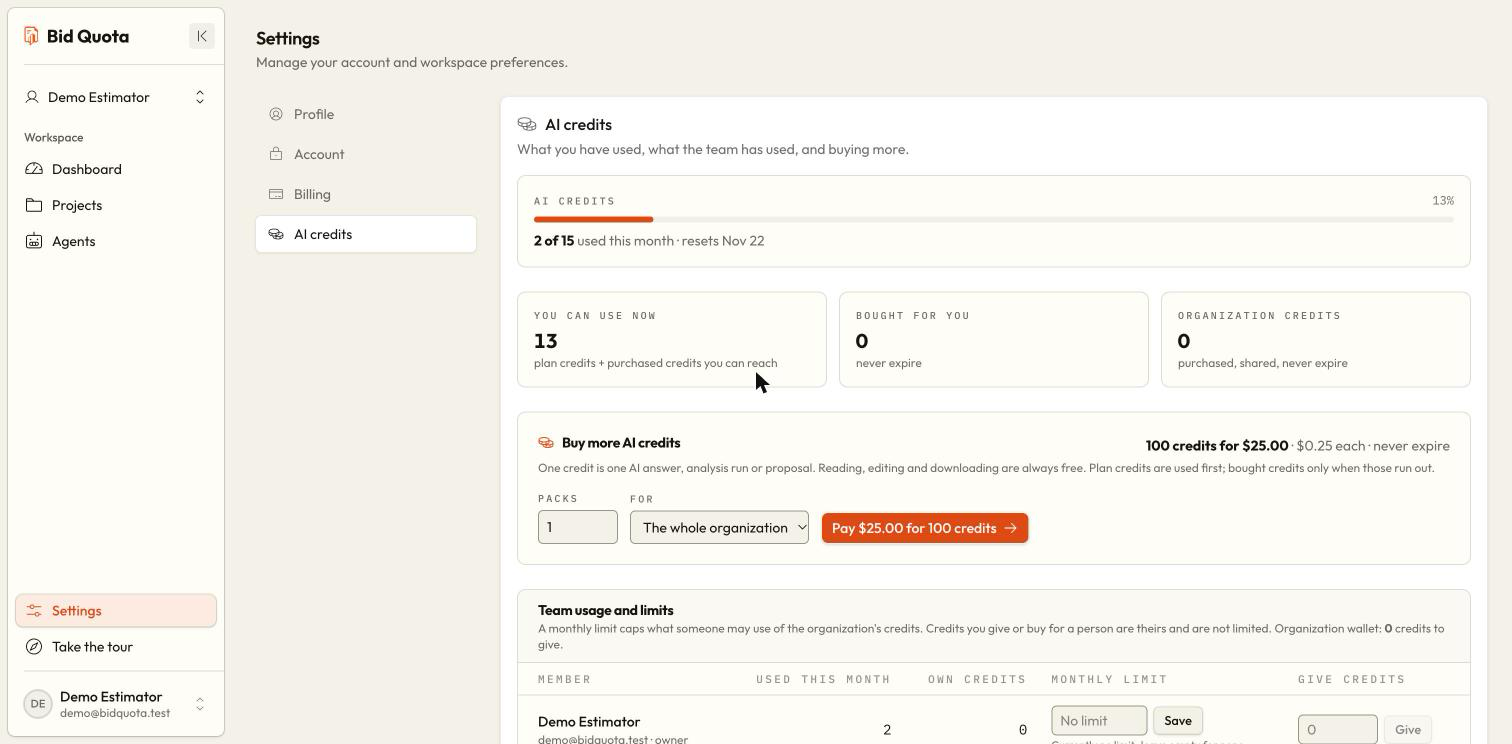
AI credits pay for assistant work. Open Settings → AI credits to see your balance and usage for the selected workspace. Plan credits follow the displayed billing period, rather than necessarily resetting on the first day of a calendar month.
What uses credits?
An assistant reply uses a credit. Analysis and proposal generation also use credits, with the cost shown before you generate in the bid-package panel. Reading existing work, editing it yourself, and downloading it do not consume AI credits. A failed chat turn is free; a stopped turn can still count.
Check your balance
Open Settings → AI credits. Read the included allowance, used amount, remaining credits, and displayed reset information.
Check a member limit
If you are a member, look for your monthly limit and organization usage. Reaching your personal cap can stop AI work even when the organization still has credits.
Ask for the right change
For a cap notice, ask the owner to raise your limit or give you credits. For exhausted workspace credits, ask about a pack or wait for the displayed reset.
Verify a purchase
After payment, return to the credits section. Allow a few moments for the balance to update, then reload if needed.
Buy extra credits
Owners and assigned administrators can use Buy more AI credits. Credit packs are offered in 100-credit packs; confirm the pack size and current price on the screen because the offer can be configured. Select the number of packs and whether to buy for the organization or a specific member, then complete checkout.
Packs are a one-time purchase and do not renew as a subscription. An active eligible plan is required to buy and use them. A canceled checkout does not add credits.
How shared and personal credits work
The plan allowance is used first, subject to a member's cap. Credits bought or given to that member can then pay for their work without using the shared cap. The organization's purchased balance can also pay when available, subject to the member's limit on organization funds.
In Team usage and limits, owners and administrators can save a member cap or Give credits from the organization's purchased balance. An empty cap means no personal cap; zero means no use of shared organization credits. Giving credits needs an available organization balance.
Two different limits
Can members buy their own packs here?
Ordinary members can view their balance but cannot buy or distribute packs. Ask the owner or an assigned administrator.
I paid but the balance has not changed
Wait a few moments and reload the credits section. Check that checkout completed and that you are viewing the workspace or recipient selected for the purchase. If it remains wrong, keep the payment confirmation and report the exact message through your usual support contact.