Estimate
Turn reviewed scope and cost data into a saved project estimate.
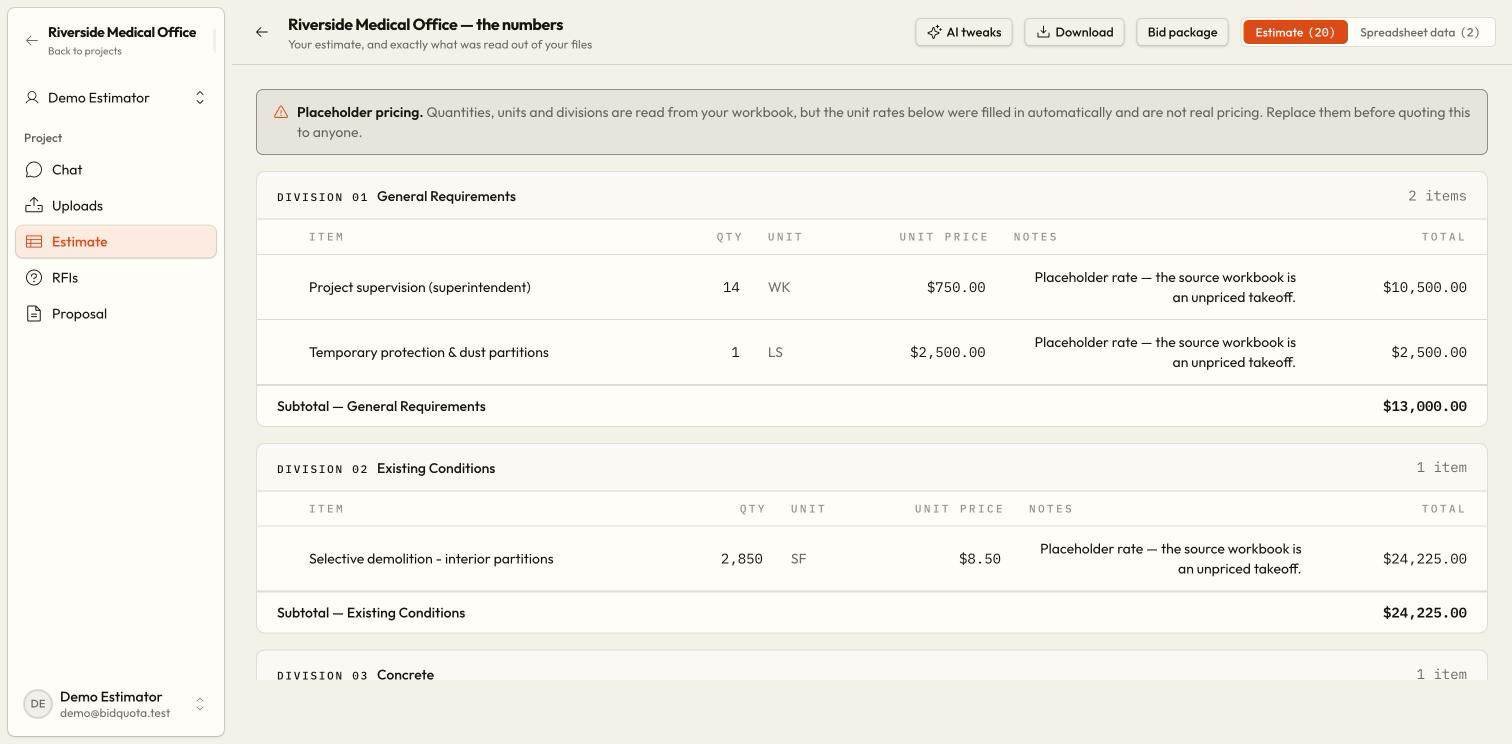
The Estimate page holds the project's saved line items and totals. It also lets you inspect the spreadsheet data read from uploaded Excel and CSV files. A chat table and a saved estimate are separate: review and confirm changes before treating them as part of the bid.
Choose a build approach
For an empty estimate, choose Build from uploaded documents, describe what you need and choose Build, or choose Open chat. Build from uploaded documents requires a previously read Excel or CSV sheet and creates starter lines with placeholder rates directly; it does not build from a PDF alone. Replace those rates before quoting. Describing your needs or opening Chat uses the assistant to propose work for confirmation.
Review the proposed lines
Check descriptions, quantities, units, prices, and source notes. Supply verified quantities and rates when the documents do not state them.
Save the proposal deliberately
Choose Update estimate on the preview. Nothing is written by the suggestion alone. Replacing existing lines needs owner approval.
Edit and price the estimate
Use editable quantity and unit-price cells and review line totals. Adjust Overhead, Profit, and Contingency using the percentage controls. Check the saving status and any error.
Request a focused adjustment
Choose AI tweaks to describe a change without leaving Estimate. The response uses the same review-and-confirm preview, and the conversation is saved in project chat.
Review and export
Check the final totals and unresolved lines, then use the export controls or Bid package. See Exports.
Inspect Spreadsheet data
Choose Spreadsheet data to inspect what was read from Excel or CSV. Original row numbers help you check a reference such as BREAKDOWN!B384: that means cell B384 on the BREAKDOWN worksheet.
The first view is limited to 250 rows per sheet and states how many are hidden. A displayed slice is not the whole workbook. Use the available row controls or original file to check more data.
Understand blank and uncertain values
A blank rate means the work still needs pricing; it does not mean the work is free. Starter lines and imported incomplete lines may contain zero placeholders. Zero is not evidence that an item is free or has no quantity; check the notes and replace placeholders before quoting. Check the original source, enter your rate, and verify the total. Review allowances and high-risk lines alongside the findings on RFIs.
Owner and member controls
Members can work on quantities, rates, and markups within their permissions. Removing lines, deleting the estimate, and confirming replacement of existing lines require the owner.
Start over removes the estimate
Does the assistant calculate a takeoff from drawings?
It can read stated dimensions and schedule quantities. It does not measure geometry or infer physical counts from repeated labels. Provide measured quantities where the drawings do not state them.